
In today’s fast-paced digital world, users demand instant gratification and expect websites to cater to their needs quickly and seamlessly. This shift in user behaviour has given rise to the concept of micro-moments, which refer to those fleeting instances when users turn to their devices to satisfy an immediate need.
Understanding and designing for these micro-moments is crucial for web designers seeking to deliver exceptional user experiences. In this blog, we will delve into the concept of micro-moments and explore how web designers can create interfaces that meet users’ immediate needs in real-time.
What are Micro-Moments?
Micro-moments are critical touchpoints in a user’s journey where they have a specific intent and expect an immediate response. These moments are often triggered by various factors, such as a question, curiosity, or a desire to know, go, do, or buy something. According to Google, micro-moments can be categorised into four types:
- “I Want to Know” moments: Users seek information or answers to their questions.
- “I Want to Go” moments: Users look for local information, such as nearby stores or places.
- “I Want to Do” moments: Users seek guidance or instructions for completing a task or activity.
- “I Want to Buy” moments: Users are ready to make a purchase and look for the best options.
Design Principles for Micro-Moments
1. Prioritise Speed and Responsiveness
Micro-moments demand immediate responses, so optimising website loading speed is paramount. Web designers should ensure fast-loading pages, smooth transitions, and responsive design to cater to users across different devices.
2. Streamline Navigation and Search
Make it easy for users to find what they are looking for by implementing clear navigation menus and prominent search functionalities. Avoid clutter and organise content logically to minimise the time users spend searching for information.
3. Offer Instant Answers and Solutions
Anticipate user needs and provide instant answers or solutions through intuitive UI elements like chatbots, dropdowns, or FAQ sections. Consider incorporating voice search capabilities to accommodate users seeking quick information on the go.
4. Utilise Visual Cues and Calls-to-Action
Use clear and eye-catching visual cues to guide users towards their intended actions. Well-designed buttons and calls-to-action (CTAs) can lead users to their desired outcomes efficiently.
5. Personalise User Experiences
Leverage user data to personalise content and recommendations, ensuring that users are presented with relevant information during their micro-moments. Personalisation enhances engagement and boosts the chances of converting leads into customers.
6. Optimise for Mobile Devices:
Micro-moments often occur on mobile devices, so prioritise mobile-friendly design. Employ responsive layouts and finger-friendly elements to accommodate users navigating with their thumbs on small screens.
7. Focus on Clear and Concise Content
Present information in bite-sized chunks, using concise and easily digestible content. Bullet points, lists, and headings can help users quickly find what they need without overwhelming them.
8. Empathise with User Goals
Put yourself in the user’s shoes and understand their intent during micro-moments. Design with empathy to ensure that your interface addresses their specific needs and frustrations effectively.
Case Study: Wick Antiques
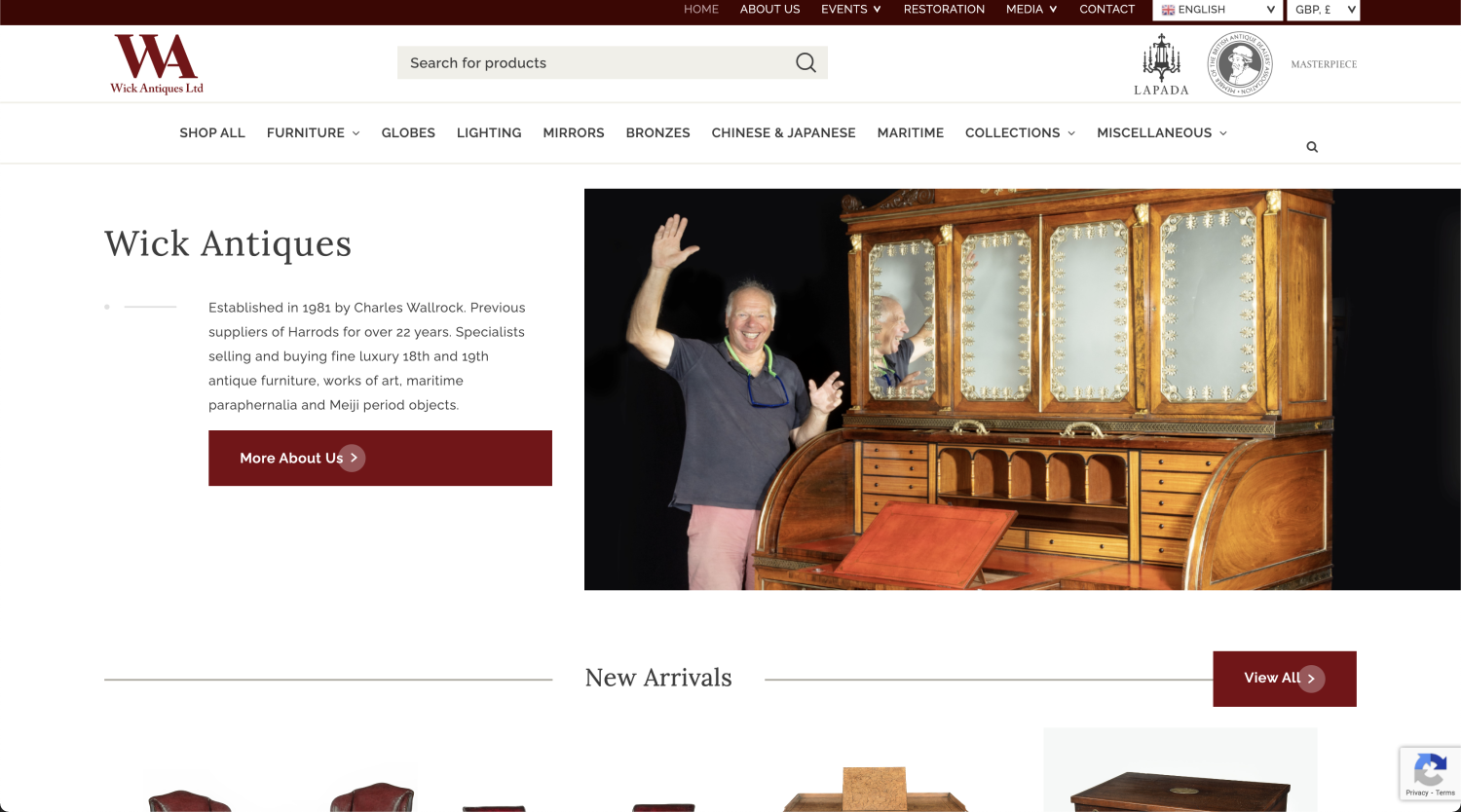
Even though Wick Antiques specialises in antique globes, that’s not everything that they sell. This is why Wick Antiques’ website design prominently featured the “Shop by Category” section, providing a seamless experience for users during micro-moments.
By catering to each micro-moment, the company witnessed significant improvements in user engagement and conversion rates.
During the “I Want to Know the History” micro-moment, users found the historical background of antique pieces captivating. This led to increased time spent on the website and a higher likelihood of inquiries and purchases. The detailed product descriptions built trust and authenticity, encouraging users to explore further.
The “I Want to Buy a Specific Antique” micro-moment was addressed effectively with intuitive categorisation. Users easily navigated to the relevant sections, reducing the time spent searching for specific items.
The “I Want to Explore” micro-moment was met with visually appealing category pages and high-quality images. Users enjoyed browsing various antique categories and gaining inspiration for their collections. The improved user experience has led to increased return visits and a rise in the number of unique users.
Conclusion
Designing for micro-moments is not just about creating visually appealing interfaces; it’s about meeting users’ immediate needs in real time and delivering a seamless user experience.
By prioritising speed, responsiveness, and personalised content, web designers can optimise websites to cater to users during these critical micro-moments. Emphasising clear navigation, intuitive calls-to-action, and mobile-friendly design will further enhance the overall user experience.
Understanding and incorporating micro-moments into the design process will undoubtedly set websites apart in an increasingly competitive digital landscape, leading to more satisfied users and increased business success.
